
Microsoft Defender XDR — Centralized Security Management
Microsoft has released a new unified portal that combines Microsoft Sentinel, Microsoft Defender XDR security products, and Microsoft Security Copilot.

Microsoft has released a new unified portal that combines Microsoft Sentinel, Microsoft Defender XDR security products (formerly Microsoft 365 Defender), and Microsoft Security Copilot. The portal is currently in Public Preview, so in this article we will go over the most significant changes and instructions for onboarding the portal.
I remember when about two years ago I first saw advertisements for Microsoft’s centralized security center, which integrates all of a customer’s environment data sources and cybersecurity incidents into one place. At that time, it was more about Microsoft Sentinel, where you could stream alerts from other security products, such as the Microsoft Defender XDR product family. However, it was not possible to modify the settings of streamed data sources from within Sentinel, so I did not consider it a true “centralized security console.” While all alerts could be viewed centrally, investigating and configuring them still required navigating to other portals.
At the beginning of this month, however, Microsoft Defender XDR portal (formerly Microsoft Defender 365) was released, which combines all signals from Microsoft security products, Sentinel’s SIEM capabilities, and Security Copilot* into a single place, enabling unified monitoring and management.
How to Onboard the Unified Portal?
Onboarding has been made into a fairly straightforward process. Note that only one Microsoft Sentinel (Log Analytics Workspace) instance can be connected to the unified portal at a time.
Requirements:
- Log Analytics Workspace running a Microsoft Sentinel instance (of course).
- Microsoft Defender XDR enabled in the Entra tenant. It is sufficient to have at least one Microsoft Defender XDR product enabled, such as Defender for Office 365 or Defender for Endpoint. The data connector mentioned below also requires this.
- Microsoft Defender XDR data connector active in Microsoft Sentinel (formerly “Microsoft 365 Defender”).
Required Roles and Permissions:
- Owner role in the Azure subscription, or User Access Administrator in the subscription and Microsoft Sentinel Contributor at the resource level.
The Onboarding Process is as Follows:
-
Navigate to security.microsoft.com (the Microsoft Defender XDR portal).
-
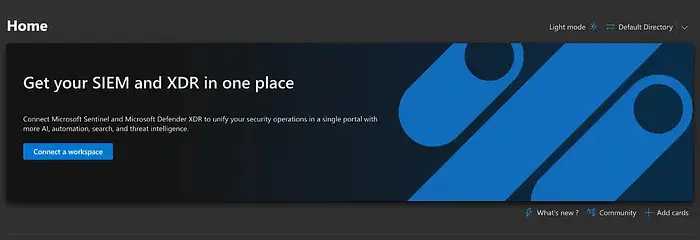
The onboarding instructions shown below should appear on the screen:
-
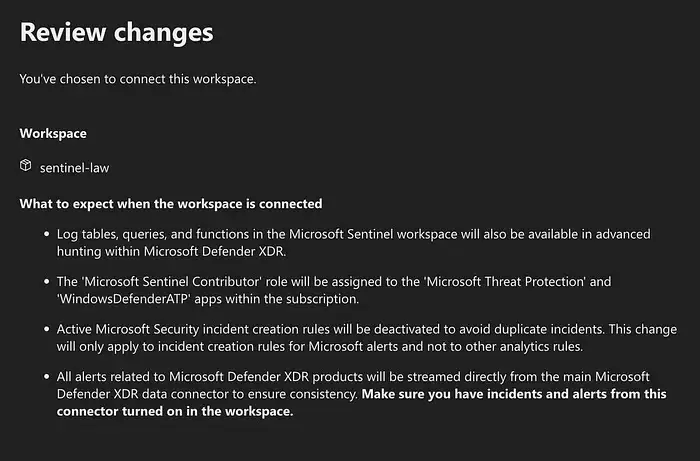
Clicking the “Connect a workspace” button opens a view where you can select the Log Analytics Workspace (Sentinel) instance to be connected.
-
Before confirming, read carefully the listed changes that may affect Sentinel’s operations:
-
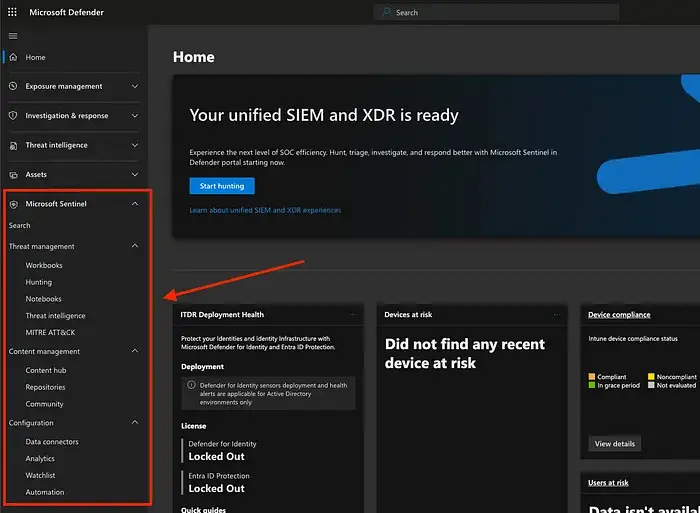
The process takes a few minutes, after which a “Microsoft Sentinel” section will appear in the left-hand navigation, allowing you to dive deep into Sentinel.
After the connection, Microsoft Sentinel remains accessible in the Azure portal as usual.
What Has Changed in the Day-to-Day Experience?
If we assume that the people responsible for Microsoft security in a company switch to using the unified portal (recommended), what are the most notable differences compared to the Azure portal?
- Sentinel Data Integration: Data within Sentinel is integrated into the Microsoft Defender XDR portal, and log searches can be run against Sentinel data from the unified portal.
- Sentinel Settings Management: Sentinel configurations can be adjusted directly from the unified portal. These include creating analysis rules, automations, installing built-in solutions, and connecting data sources. However, final edits may take place in the Azure portal, where the user is automatically redirected.
- Unified Incident Queue: Incidents from all systems are listed in a single, shared queue, where they can be investigated, closed, and escalated.
- Centralized Security Management: The entire Microsoft security estate can be managed and configured from a centralized system.
- Automation Changes: After onboarding, the “Incident Provider” field has been removed from Sentinel’s automation rules, which previously defined the origin of the incident (Microsoft Sentinel or Microsoft Defender XDR products). Therefore, if you have automation rules triggered by this field, they will now run on all incidents regardless of their origin.
- Log Search Location: The “Logs” search page has moved to the tab “Investigation & Response -> Hunting -> Advanced Hunting”.
Complete List of Navigation Changes:
https://learn.microsoft.com/en-gb/azure/sentinel/microsoft-sentinel-defender-portal
Summary
The unified portal provides a convenient way to manage Microsoft security products and Sentinel, but it is not necessary for everyone. The migration is simple, so it is highly recommended to try it and determine whether it is more practical for you than the Azure portal.
If you need support with Microsoft security products, contact us and we can schedule a meeting!
Sources
- https://www.microsoft.com/en-us/security/blog/2024/04/03/get-end-to-end-protection-with-microsofts-unified-security-operations-platform-now-in-public-preview/
- https://learn.microsoft.com/en-us/microsoft-365/security/defender/microsoft-sentinel-onboard?view=o365-worldwide
- https://learn.microsoft.com/en-us/azure/sentinel/microsoft-sentinel-defender-portal?toc=%2Fmicrosoft-365%2Fsecurity%2Fdefender%2Ftoc.json&bc=%2Fmicrosoft-365%2Fsecurity%2Fdefender%2Fbreadcrumb%2Ftoc.json&view=o365-worldwide
Tekve Oy provides support in Microsoft security and security operations.