
Migrating from Legacy SIEM to Microsoft Sentinel
Microsoft Sentinel is a cost-effective and rapidly scalable SIEM/SOAR system that helps organizations secure their on-premises systems and cloud resources.

Microsoft Sentinel is a cost-effective and rapidly scalable SIEM/SOAR system that helps organizations secure their on-premises systems and cloud resources. As log data grows, additional storage can be provisioned instantly with a payment card without waiting for new physical storage devices to arrive at an on-premises datacenter.
Organizations may have a traditional on-premises security monitoring system (SIEM) that has been deeply integrated into their processes. Traditional SIEM systems are often incapable of monitoring the cybersecurity of cloud resources, and their scalability is typically slow and limited. Many organizations use (or will use) cloud services for business-critical tasks such as user management, email, file storage, and running applications. For this reason, organizations are increasingly interested in migrating to cloud-based cybersecurity monitoring and leaving legacy SIEM systems (QRadar, ArcSight, LogRhythm) behind.
Sentinel offers a 30-day free trial, making it relatively easy and inexpensive for new users to test.
In this article, we will go through how the migration to Sentinel proceeds, what needs to be considered, and how Microsoft Sentinel’s tools can help in this process.
Current State Analysis
First, identify and document all features and cybersecurity monitoring processes of the current SIEM system that you want to migrate to Microsoft Sentinel. These include the technologies used, data sources, detection rules, threat intelligence sources, and monitoring processes (i.e., identifying, investigating, and resolving alerts).
Next, identify business-critical assets that are at the top of the priority list for protection. These assets may include specific users, sensitive files, virtual machines, and servers.
The goal is to create comprehensive documentation of the current monitoring state and processes, which serves as a foundation for planning the migration to the new cloud-based monitoring.
Planning the Migration
A good plan is the key to everything. It ensures that there are no unpleasant surprises or situations where the next step forward is unclear during the project. The goal of the plan is to create documentation of Sentinel’s architecture, data sources, analytical rules, visualizations, and processes. This documentation maps the solutions used in the legacy SIEM to those in Sentinel.
Key Considerations:
- Sentinel Architecture: Is a Log Analytics Workspace set up for Sentinel? Do regulations require data to be distributed across multiple Azure regions? Are multiple Azure tenants in use?
- Built-in Solutions: Do not reinvent the wheel. Sentinel includes several built-in (“out-of-the-box”) solutions that save time and money.
- Cost Estimation: During the planning phase, it is wise to project how much using Sentinel will cost once the desired data sources are connected. The Azure Pricing Calculator is a great tool for cost estimation. More information about pricing.
- Data Sensitivity: All Sentinel data resides in Microsoft datacenters, so it is necessary to consider how much sensitive data is transferred there and in what format.
Implementation
In an ideal world, implementation is just following the plan step by step and creating sufficient documentation (resource names, etc.). It is recommended to perform the migration incrementally by first creating an MVP (Minimum Viable Product), allowing Sentinel to be tested before a full migration.
Here are a few steps of the implementation:
- Connecting Data Sources
- Installing Pre-built Solutions (Content Hub): Rules and data sources identified during the analysis phase may exist as pre-built solutions in Sentinel, meaning you do not have to write analysis rules from scratch.
- Creating Analysis Rules: Requires knowledge of KQL (Kusto Query Language). Includes creating new analysis rules based on data sources and converting existing rules from legacy SIEM to Sentinel.
- Creating Automations (Azure Logic Apps): Sentinel allows for the creation of powerful automations. The goal is to automate processes identified in the assessment, saving time and money. Automations must also be tested before deployment.
- Creating Visualizations (Workbooks): Many legacy SIEMs have views to detect patterns and generate reports for management. In Sentinel, these views are “Workbook” resources, which can also generate automated Power BI reports.
The result is a working MVP version of Sentinel, which can be used to identify benefits and areas for improvement. After implementation, the monitoring process begins, during which analytical rules are fine-tuned to reduce the number of false-positive alerts. Activating new data sources should be done gradually to avoid cluttering the alert view with hundreds of alerts a day.
Migration Tools
Converting Detection Rules
About a month ago, Microsoft released a new migration feature in Sentinel that allows legacy SIEM detection rules to be converted directly into KQL-based analysis rules. This feature currently only supports migration from Splunk. Migrating from other systems still requires manual rule conversion, where Tekve’s experts are happy to help.
Monitoring the Migration
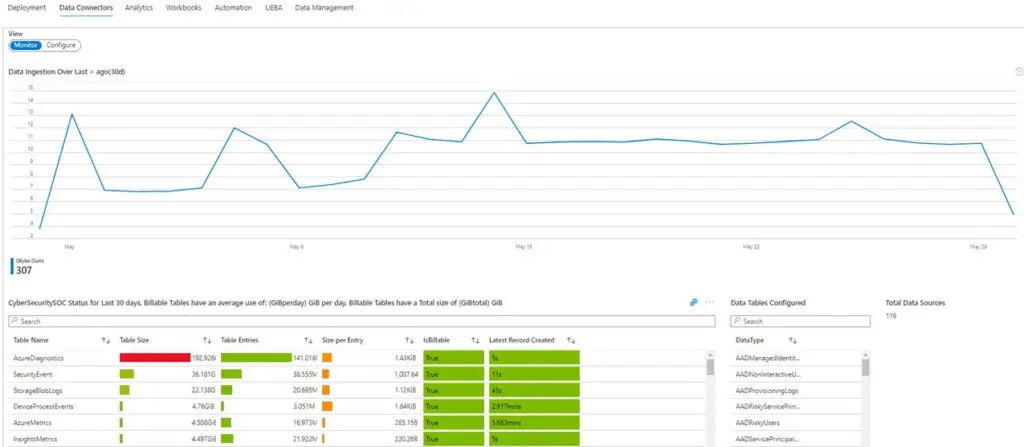
Microsoft Sentinel includes a visualization (workbook) to track the migration process. In this visualization, you can monitor migration status, tasks to be performed, and even create a migration plan.
Conclusion
Carrying out a migration is a project that requires time and patience to plan and execute. The existing monitoring system should only be decommissioned when Microsoft Sentinel is fully operational. After the migration, actual cybersecurity monitoring begins, and process fine-tuning continues.
Tekve’s experts are happy to help at all stages of migration as well as in continuous cybersecurity monitoring, so feel free to contact us!